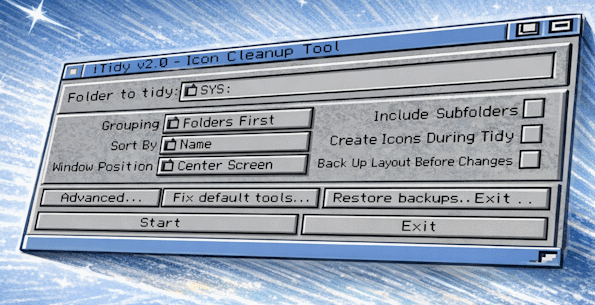
About iTidy 2
iTidy 2 is a Workbench utility for tidying icon layouts and drawer windows in a consistent, repeatable way. It was written for AmigaOS 3.2 and later, and is intended for real situations where large extractions, cover disks, and long-lived Workbench setups gradually leave drawers in a messy state.
The program works only with Workbench metadata such as .info files and drawer layout information. It does not alter the contents of the data files in those drawers.
Why I made it
Workbench cleanup only handles one drawer at a time. That is manageable for small folders, but not for large WHDLoad collections or partition-wide tidy jobs. iTidy 2 automates the process across whole directory trees and applies one consistent layout policy throughout.
This new version also integrates with DefIcons to create missing icons and generate preview icons for supported file types, bringing a modern experiance to browsing drawers but precalculating icons and posistions without the realtime overhead.
As in the previous version, it also addresses missing icons and broken default tools, both of which are common on older or heavily used systems.
What It Can Do
- Recursive tidying across whole folder trees or partitions.
- Automatic icon grid layout and drawer window resizing.
- Multiple grouping and sort modes, including grouped-by-type layouts.
- Optional LhA-based backup and restore for layout changes.
- Default tool analysis and batch repair.
- DefIcons-based icon creation for supported file types.
- Picture thumbnail icon generation and text preview icon generation.
- Saved presets and startup ToolTypes such as LOADPREFS.
Manual
A full AmigaGuide manual is supplied as iTidy2.guide. The GitHub project also contains the current documentation and source tree for the newer ReAction-based version.
Typical Use
A user points iTidy 2 at a location such as Work:WHDLoad/, enables recursive processing, chooses a layout style, and optionally enables icon creation. The program then tidies layouts, resizes drawer windows, creates missing icons where supported, and creates a backups if that option is enabled. Default tools found during the run can also be analyzed and updated if necessary.
Requirements
- AmigaOS 3.2 or newer
- ReAction-compatible Workbench 3.2 environment
- TCP/IP stack with bsdsocket.library
- LhA in C: to enable backup and restore features
Aminet: v2.0 · 623 downloads · checked 05 Oct 2026