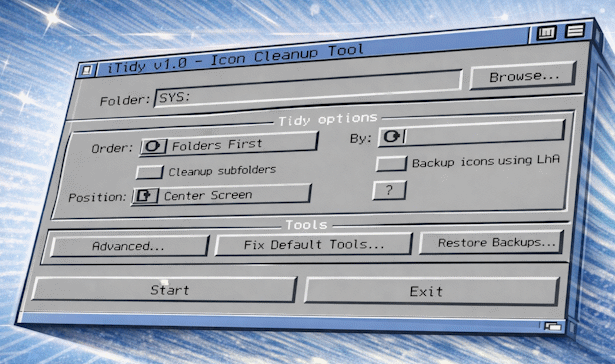
About iTidy
The original iTidy was written for older AmigaOS 3.x setups, including systems that do not use the newer ReAction-based interface found in iTidy 2. It focuses on arranging icons into a consistent layout, resizing and positioning drawer windows, and optionally creating backups before changes are made. Icons tooltypes can be checked to see if they are valid, and updated on mass if necessary.
Note: it updates only Workbench .info files and layout metadata rather than touching the data files themselves.
Why I Made It
After unpacking large WHDLoad sets, archive collections, or just after normal use, Workbench windows and icons often end up in inconsistent positions. Cleaning that up drawer by drawer is slow and repetitive. iTidy automates the job across folders and subfolders and keeps the result consistent.
It also helps find and repair icons whose default tools no longer exist on the current system.
What It Can Do
- Recursive processing of subfolders.
- Automatic icon grid layout.
- Drawer window resizing and positioning.
- Multiple grouping and sort modes.
- Optional LhA-based layout backup and restore.
- Default tool analysis and repair.
- Preset saving and loading for repeatable runs.
Manual
A full AmigaGuide manual is supplied as iTidy.guide. The original version remains useful for older AmigaOS 3.x systems where the newer ReAction-based build is not the right fit.
How You Might Use It
A user selects a drawer or partition, chooses grouping and sorting behaviour, optionally enables recursive cleanup and backups, and runs the tool. iTidy then updates icon positions and drawer windows across the selected tree. After the tidy process, the user can view details about default tools found during the run, and update them if necessary.
Requirements
- AmigaOS 3.0 or newer
- TCP/IP stack with bsdsocket.library
- LhA in C: to enable backup and restore features
Aminet: v1.0 · 984 downloads · checked 05 Oct 2026