| Name | WHDFetch |
|---|---|
| Interface | CLI |
| Requirements | AmigaOS 3.0 or newer, TCP/IP stack with bsdsocket.library, c:unzip, c:lha, and c:unlzx for LZX support |
| Status | Current source material describes release 0.9b |
Overview
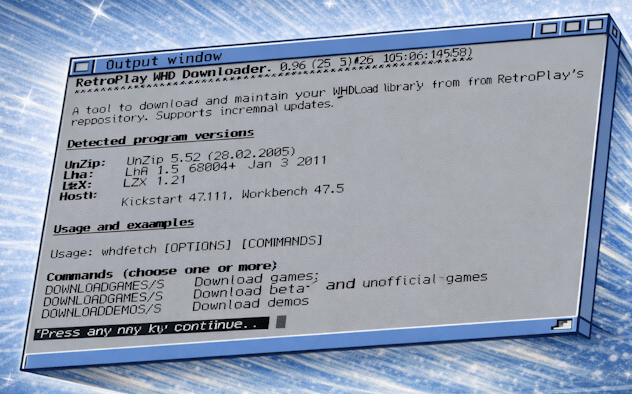
WHDFetch is a command-line utility for building and maintaining a WHDLoad collection directly on an Amiga. It downloads Retroplay Games, Demos, Magazines, and beta packs from the Turran server, parses the DAT listings, applies machine-specific filters, then downloads and extracts the required archives.
Later runs compare the existing local setup against the current DAT listings so the program can skip items that are already up to date.
What Problem It Solves
Manually downloading WHDLoad packs, extracting them, organising them, and then checking for updates later is time-consuming on real Amiga hardware. WHDFetch automates that workflow and keeps the extraction work on the Amiga side, which also helps preserve Amiga-specific metadata.
It also includes a space-estimation mode so users can see how much storage a chosen set of packs will need before committing to a full run.
Key Features
- Downloads Games, Demos, Magazines, and beta Retroplay packs.
- Downloads only new or updated archives after comparing DAT listings.
- Supports AGA, CD, NTSC, and non-English filters.
- Provides ESTIMATESPACE mode before a real download.
- Can extract automatically and optionally keep or delete archives afterwards.
- Uses local index files and extraction markers for faster skip detection.
- Supports INI-based configuration and session reports saved to disk.
Documentation
A full manual is supplied and covers commands, filters, extraction modes, icon handling, INI configuration, reporting, and skip detection.
Typical Use
A user first runs WHDFetch ESTIMATESPACE, optionally combined with filters such as SKIPAGA, then launches a pack command such as DOWNLOADGAMES with EXTRACTTO=Work:WHDLoad/. WHDFetch downloads the DAT data, works out what is new or missing, fetches the required archives, extracts them, writes tracking markers, and saves a session report.